Solutions
Anticafe & time-café software
Anticafe software tracks how long a guest stays, bills per-minute or hourly rates automatically, and puts tea and snacks on the same bill. Heselo does this in a browser cloud panel — no install, no on-site server.
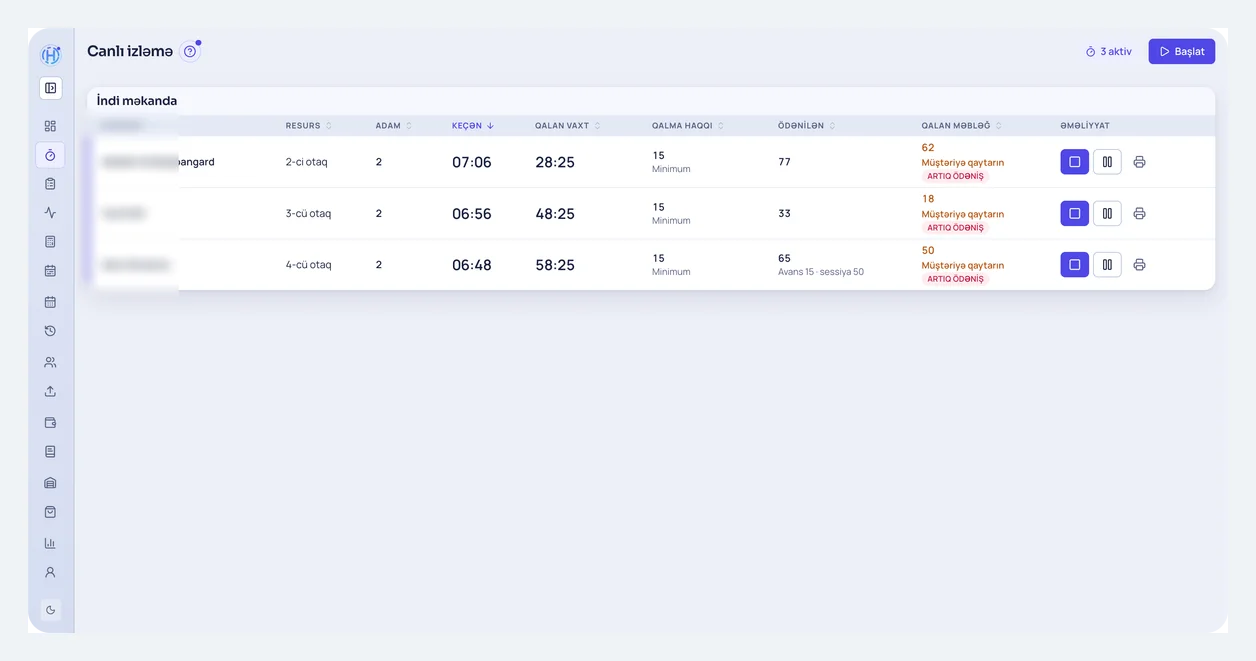
What does Heselo give an anticafe?
Four steps: guest arrives or books → live session opens → products go on the same bill → payment posts to the shift. Tables, rooms, and stations are separate resources; rate rules live in the panel.
What is anticafe software?
Anticafe software (also called anti-café or time-café software) records guest time, applies your tariff, and runs snack sales alongside it. A plain timer only counts minutes; a real panel keeps the schedule, live sessions, cash shift, and stock in one place.
A typical day: front desk sees free seats, seats a walk-in or booking, opens a session. Tea or snacks become lines on that bill. At checkout, time and products total together; shift close produces the report.
Time billing: per-minute, hourly, packages, stop-check
Three common models: per-minute (fair for short visits), hourly (simple), and stop-check — a daily cap after which time charges stop growing. Packages are prepaid blocks such as “3 hours” or “day pass”. In Heselo you configure these rules; the live session updates the amount.
Example (replace with your rates): first hour 5 USD, then 0.08 USD per minute, daily stop-check 15 USD. For 2 h 20 m the system combines the hour and minute parts; once the stop-check ceiling is hit, time charges do not climb further. Tea and snacks stay separate lines on the same bill.
For rent math and break-even guest-hours, see the anticafe rent and hourly fee guide.
Tables, zones, and rooms
Open floor, VIP room, PlayStation zone, or cinema room can each be a resource with its own rate. Free/busy status is visible; moves and cancels stay in history.
VIP hourly rates can differ from open-floor per-minute pricing. PS stations and tables sell in the same shift but split cleanly in reports.
Free tea/coffee and mini-bar
Many anticafes include tea and coffee, while snacks are paid. Track “free” consumables via inventory (stock falls, revenue comes from time). Paid snacks post as session sales.
Walk-in tea-only guests can use quick sale from the same product list — no second POS.
Board games and consoles
Heselo can treat consoles and stations as schedule resources: a PS seat is its own place type with booking and sessions. Board-game boxes can be inventory items.
We do not auto-shut consoles or drive smart plugs for lights/TVs today — that is separate hardware. Time tracking and cash stay in the panel; power control is a roadmap topic.
Cloud panel — check from your phone
Heselo is a browser cloud panel: a tablet or PC at the desk is enough; you do not host a server. With internet you can review the schedule and live sessions remotely.
If the connection drops, the panel stops — there is no offline cash mode. Stable internet (and mobile backup) matters. Unlike desktop one-time-license anticafe tools, updates and backups run in the cloud.
Cash shift and reports
Open the shift, run sessions and sales, close the day. Cash, card, and other methods show in the shift report — no evening spreadsheet reconciliation.
Stock counts refresh snack levels. Audit trails show who changed what when several admins work at once.
What Heselo does not do
Heselo is not a fiscal register and does not replace a bank card terminal. You connect fiscal and bank hardware separately; Heselo runs time, sessions, shift, and stock.
It is not a kitchen/KDS restaurant POS. If orders are the main revenue, keep a restaurant stack. There is no separate loyalty / club-card / bonus module today — customer records and session history exist.
Pricing
The Small anticafe plan starts at 19 USD a month. Medium, Large, annual billing, and limits are on the pricing page. Demo is free; no card required.
It is a monthly (or annual) cloud subscription — not a one-time license. Multi-branch venues that outgrow standard plans get a custom quote.
Features for anticafes
Time tracking & rates
Per-minute, hourly, packages, and stop-check — amount updates live.
Zone and room booking
Tables, VIP, PS zones — schedule, move, and history.
Tea and mini-bar on one bill
Session lines and quick sale share the same product list.
Cash & inventory
Shift close, reports, stock, and counts.
Who is it for?
Time-based tables and rooms, PC or board-game zones, tea and snack sales — anti-cafés, time cafés, and similar lounges. Multiple halls and rooms in one panel.
Typical anti-café friction
- Which table or room is free — front desk loses time
- Per-minute rates, packages, and stop-check done by hand
- Snacks never land on the time bill
- Cash count does not match sales at day close
Analytics
This weekHow your venue is performing
Revenue by space
This weekTap a row to select
Beyond a simple timer or spreadsheet
A timer alone does not give booking history, inventory, or cash count. Heselo runs daily booking, time billing, sales, and cash in one cloud panel — same pattern as gaming clubs and billiards. Deeper reading: “What is an anti-café management system?” and “How to open an anticafe”.
Anticafe guides
Time tracking, tariff choices, opening steps, and rent/hourly math — practical answers separate from the product page.